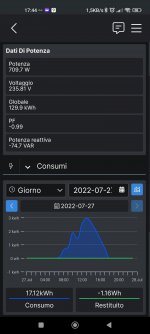
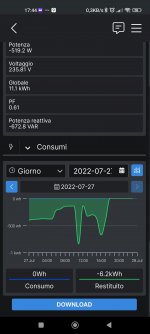
Ciao, mi puoi dire come hai fatto? grazie
Per prima cosa prendere una chiavetta USB e formattarla in EXT2 con Mini Tool Partition Wizard
Poi installare Entware
https://wiki.dd-wrt.com/wiki/index.php/Installing_Entware
cd /opt (click enter)
wget
http://bin.entware.net/mipssf-k3.4/installer/generic.sh (click enter)
sh generic.sh (click enter)
opkg update (click enter)
opkg upgrade (click enter)
The Final Step is to add the following commands to the start-up script (Administration tab - then Commands). The sleep value can be adjusted, but 10 is long enough for most USB Harddrives/routers:
sleep 10
/opt/etc/init.d/rc.unslung start
opkg install bc (click enter)
opkg install jq (click enter)
opkg install coreutils-tee (click enter)
opkg install nano (click enter)
opkg install bash (click enter)
Nel router ddwrt in Administration Cron aggiungere le seguenti righe:
PATH=/bin:/usr/bin:/sbin:/usr/sbin:/jffs/sbin:/jffs/bin:/jffs/usr/sbin:/jffs/usr/bin:/mmc/sbin:/mmc/bin:/mmc/usr/sbin:/mmc/usr/bin:/opt/sbin:/opt/bin:/opt/usr/sbin:/opt/usr/bin:/opt

pt/bin:/bin/date:/opt:/opt/bin
*/5 * * * * root /bin/bash /opt/bin/pvc.sh
Nel router ddwrt in /opt/bin aggiungere lo script di Virtualj modificato e nominarlo pvc.sh
Lo script è questo, basta modificare i valori di account, apikey e id con i vostri valori.
un chmod 777 potrebbe essere necessario per pvc.sh
--------------------------------------------------------------------------------------------------------------------
#bin/bash
#Required Unix tool bc & jq
###### SHELLY EM SECTION #######
#insert Shelly EM admin user
readonly SHEM_USER="xxx@gmail.com"
#insert Shelly EM admin password
readonly SHEM_PWD="xxxxx"
#insert Shelly EM local IP
readonly SHEM_IP="192.168.1.41"
#insert Shelly EM ID of PhotoVoltaic Meter PRODUCTION POSITIVE VALUE
readonly SHEM_PV_ID="0"
#insert Shelly EM ID of Grid Meter GRID POSITIVE VALUE FOR CONSUMED, NEGATIVE FOR RETURNED
readonly SHEM_GRID_ID="1"
#insert Multiplayer in percent for Energy correction, 0 for no correction, positive for increment, negative to reduce
readonly SHEM_MISUREMENT_ADJUST="0"
###### PV Output SECTION #######
#insert PV Output API Key (from
https://pvoutput.org/account.jsp)
readonly PVOUTPUT_APIKEY="xxxxx63d849f5f2aafd8e6c5"
#insert PV Output System ID (from
https://pvoutput.org/account.jsp)
readonly PVOUTPUT_SYSID="xxxxxx"
#insert "yes" to upload also production data from Shelly EM, "no" to upload only consumption
readonly UPLOAD_PROD="yes"
###### SOLAREDGE SECTION #######
#if you want to skip SolarEdge data upload uncomment the following line
readonly SEUPDATE="no"
#insert SolarEdge Site ID
readonly SE_SITEID="1571234"
#insert SolarEdge Inverter Serial Number
readonly INVERTERSN="xxxxx-E7"
#insert SolarEdge API Key
readonly SE_APIKEY="xxxxUXXXXXXXXXXXXXX"
readonly VAR_FILE="$HOME/INITIALVALUES"
readonly LOG_FILE="$HOME/Shelly2PVOutput.log"
SEUPDATE="yes"
echo "Start getting measurement from Shelly EM "$SHEM_IP" and upload to PVOutput "$PVOUTPUT_SYSID | tee -a $LOG_FILE
echo "START TIME: "$(date +%R:%S) | tee -a $LOG_FILE
[[ -f $VAR_FILE ]] && { [[ $(date -r $VAR_FILE +%F) == $(date +%F) ]] && source $VAR_FILE || rm -f $VAR_FILE; }
if ! [[ -f $VAR_FILE ]]; then
CONSUMED=$(curl --user $SHEM_USER:$SHEM_PWD -s http://$SHEM_IP/emeter/$SHEM_GRID_ID | jq '.total')
echo "SHELLY ENERGY CONSUMED: "$CONSUMED" Wh" | tee -a $LOG_FILE
RETURNED=$(curl --user $SHEM_USER:$SHEM_PWD -s http://$SHEM_IP/emeter/$SHEM_GRID_ID | jq '.total_returned')
echo "SHELLY ENERGY RETURNED: "$RETURNED" Wh" | tee -a $LOG_FILE
PV=$(curl --user $SHEM_USER:$SHEM_PWD -s http://$SHEM_IP/emeter/$SHEM_PV_ID | jq '.total')
echo "SHELLY ENERGY PRODUCED: "$PV" Wh" | tee -a $LOG_FILE
TOTAL=$(bc -l echo "SHELLY ENERGY TOTAL BALANCE: "$TOTAL" Wh" | tee -a $LOG_FILE
PVOutputSTART=$(curl -s -d "d="$(date +%Y%m%d) -d "stats=1" -H "X-Pvoutput-Apikey: "$PVOUTPUT_APIKEY -H "X-Pvoutput-SystemId: "$PVOUTPUT_SYSID
https://pvoutput.org/service/r2/getstatus.jsp)
IFS=';' read -ra TEMP IFS=',' read -ra TEMP0 IFS=',' read -ra TEMP1 re='^[0-9]+$'
if ! [[ $TEMP0 =~ $re ]] ; then
PVOutputENERGY=0
else
PVOutputENERGY=${TEMP0}
fi
echo "PV Output ENERGY PRODUCED: "$PVOutputENERGY" Wh" | tee -a $LOG_FILE
if ! [[ $TEMP1 =~ $re ]] ; then
PVOutputENERGYUSED=0
else
PVOutputENERGYUSED=${TEMP1}
fi
echo "PV Output ENERGY USED: "$PVOutputENERGYUSED" Wh" | tee -a $LOG_FILE
echo -e "TOTAL=$TOTAL\nPVOutputENERGY=$PVOutputENERGY\nPVO utputENERGYUSED=$PVOutputENERGYUSED\nPV=$PV" > $VAR_FILE
echo "First Time of the day. Exit" | tee -a $LOG_FILE
exit 0
fi
echo -e "LAST TOTAL ENERGY COUNTER: "$TOTAL" Wh\nPVOutput ENERGY Production: "$PVOutputENERGY" Wh\nPVOutput ENERGY Used: "$PVOutputENERGYUSED" Wh" | tee -a $LOG_FILE
CONSUMED_now=$(curl --user $SHEM_USER:$SHEM_PWD -s http://$SHEM_IP/emeter/$SHEM_GRID_ID | jq '.total')
RETURNED_now=$(curl --user $SHEM_USER:$SHEM_PWD -s http://$SHEM_IP/emeter/$SHEM_GRID_ID | jq '.total_returned')
PV_now=$(curl --user $SHEM_USER:$SHEM_PWD -s http://$SHEM_IP/emeter/$SHEM_PV_ID | jq '.total')
PV_POWER=$(curl --user $SHEM_USER:$SHEM_PWD -s http://$SHEM_IP/emeter/$SHEM_PV_ID | jq '.power')
if [[ $PV_POWER =~ "-" ]]; then
PV_POWER=0
fi
GRID_POWER=$(curl --user $SHEM_USER:$SHEM_PWD -s http://$SHEM_IP/emeter/$SHEM_GRID_ID | jq '.power')
VOLTAGE=$(curl --user $SHEM_USER:$SHEM_PWD -s http://$SHEM_IP/emeter/$SHEM_PV_ID | jq '.voltage')
CONSUMPTION_POWER=$(bc -l TOTAL_now=$(bc -l echo "TOTAL ENERGY COUNTER @"$(date +%R) $TOTAL_now" Wh" | tee -a $LOG_FILE
ENERGY=$(bc -l 100)+$PVOutputENERGYUSED)")
PV_ENERGY=$(bc -l 100)+$PVOutputENERGY")
printf "\e[1;34mData from Shelly @"$(date +%R:%S)"\n\e[0m" | tee -a $LOG_FILE
echo "PV Power: "$PV_POWER" W" | tee -a $LOG_FILE
echo "Cons Power: "$CONSUMPTION_POWER" W" | tee -a $LOG_FILE
printf "PV Energy now: %.1f Wh\n" $PV_ENERGY | tee -a $LOG_FILE
printf "Energy now: %.1f Wh\n" $ENERGY | tee -a $LOG_FILE
if test "$UPLOAD_PROD" = "yes"; then
curl -d "d="$(date +%Y%m%d) -d "t="$(date +%R) -d "v1="$PV_ENERGY -d "v2="$PV_POWER -d "v3="$ENERGY -d "v4="$CONSUMPTION_POWER -d "v6="$VOLTAGE -H "X-Pvoutput-Apikey: "$PVOUTPUT_APIKEY -H "X-Pvoutput-SystemId: "$PVOUTPUT_SYSID
https://pvoutput.org/service/r2/addstatus.jsp | tee -a $LOG_FILE
else
curl -d "d="$(date +%Y%m%d) -d "t="$(date +%R) -d "v2="$PV_POWER -d "v3="$ENERGY -d "v4="$CONSUMPTION_POWER -d "v6="$VOLTAGE -H "X-Pvoutput-Apikey: "$PVOUTPUT_APIKEY -H "X-Pvoutput-SystemId: "$PVOUTPUT_SYSID
https://pvoutput.org/service/r2/addstatus.jsp | tee -a $LOG_FILE
fi
printf "\n" | tee -a $LOG_FILE
if test "$SEUPDATE" = "yes"; then
SEUPDATE="no"
TENMINSAGO=$(($(date +%s)-15*60))
SELIVEDATA=$(curl -s "https://monitoringapi.solaredge.com/equipment/"$SE_SITEID"/"$INVERTERSN"/data.json?startTime=$(date -d @$TENMINSAGO +%F)%20$(date -d @$TENMINSAGO +%T)&endTime=$(date +%F)%20$(date +%T)&api_key="$SE_APIKEY)
count=$(echo $SELIVEDATA | jq '.data.count')
for i in $(seq 0 $(($count-1))); do
SELIVEDATAAR=$(echo $SELIVEDATA | jq '.data.telemetries['$i'].date,.data.telemetries['$i'].temperature,.data.telemetries['$i'].L1Data.acVoltage,.data.telemetries['$i'].L1Data.activePower')
eval "array=($SELIVEDATAAR)"
SELIVEDATA_date=${array[0]}
SELIVEDATA_temp=${array[1]}
SELIVEDATA_acV=${array[2]}
SELIVEDATA_Power=${array[3]}
printf "\e[1;31mData from SolarEdge\n\e[0m" | tee -a $LOG_FILE
echo "SE data: "$SELIVEDATA_date | tee -a $LOG_FILE
echo "SE Temp: "$SELIVEDATA_temp" °C" | tee -a $LOG_FILE
echo "SE AC V: "$SELIVEDATA_acV" V" | tee -a $LOG_FILE
echo "SE Power: "$SELIVEDATA_Power" W" | tee -a $LOG_FILE
curl -d "d="$(date -d "$SELIVEDATA_date" +%Y%m%d) -d "t="$(date -d "$SELIVEDATA_date" +%R) -d "v2="$SELIVEDATA_Power -d "v5="$SELIVEDATA_temp -d "v6="$SELIVEDATA_acV -H "X-Pvoutput-Apikey: "$PVOUTPUT_APIKEY -H "X-Pvoutput-SystemId: "$PVOUTPUT_SYSID
https://pvoutput.org/service/r2/addstatus.jsp | tee -a $LOG_FILE
printf "\n" | tee -a $LOG_FILE
done
else
SEUPDATE="yes"
fi
echo -e "TOTAL=$TOTAL\nPVOutputENERGY=$PVOutputENERGY\nPVO utputENERGYUSED=$PVOutputENERGYUSED\nPV=$PV\nSEUPD ATE=$SEUPDATE" > $VAR_FILE